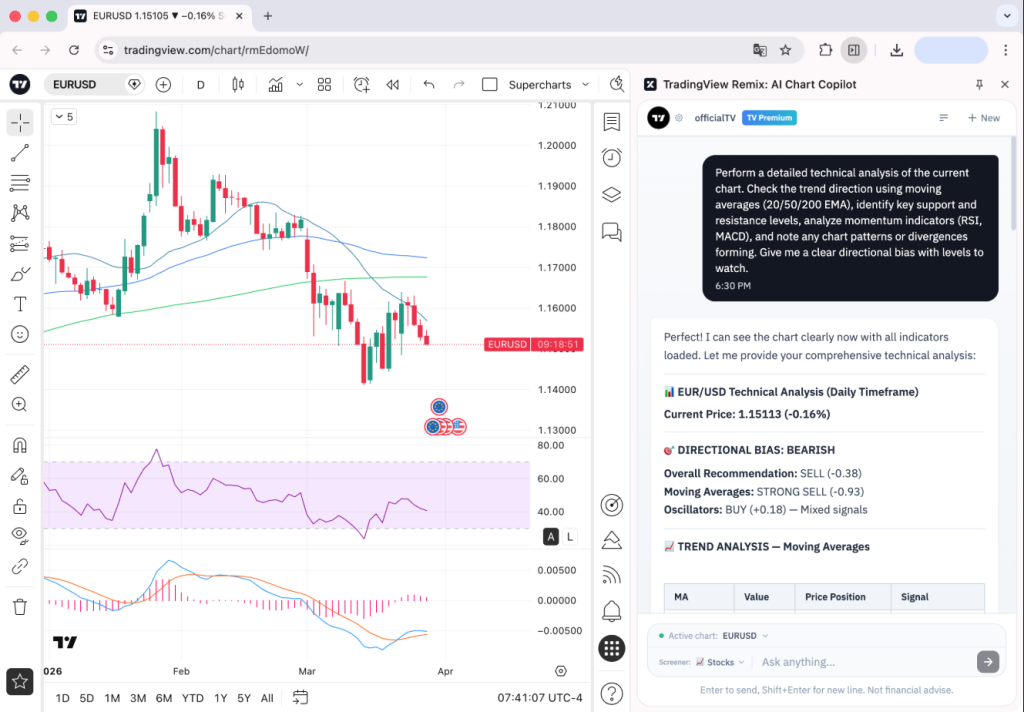


https://www.tradingview.com/blog/en/tradingview-ai-chart-copilot-beta-57730/
TradingView has long been the go-to charting platform for day traders and investors worldwide. Now it is taking a significant step forward with TradingView AI, an intelligent Chart Copilot that lets you interact with your charts through natural conversation rather than endless clicks and menu navigation.
If you have been looking for a smarter way to analyze markets, set alerts, and find trade setups without spending hours glued to your screen, this is worth paying close attention to.
What Is TradingView AI?
TradingView AI is a browser-based Chart Copilot that sits alongside your existing TradingView charts. Instead of manually working through indicators, scanning tools, and alert dialogs one by one, you simply ask questions and the AI does the heavy lifting for you.
Think of it as having an experienced trading assistant available around the clock, one that can read your charts, pull in the latest news, identify key price levels, and set your alerts, all through a simple chat interface.
It currently runs as a browser extension compatible with all major Chromium-based browsers including Chrome, Edge, Brave, Opera, and Vivaldi. TradingView has confirmed that a fully native integration across all browsers and the desktop application is the end goal.
Who Is TradingView AI Built For?
TradingView AI is designed for two core groups:
Day traders who need fast, accurate technical reads on multiple assets without manually cycling through indicators on every chart. Speed matters when you are trading intraday, and TradingView AI compresses what used to take several minutes into a single prompt.
Investors who want to quickly understand why a stock is moving, what the technicals look like, and whether recent news or earnings data supports their thesis, without toggling between multiple platforms and data sources.
If you are new to TradingView or exploring whether AI tools can genuinely improve your trading workflow, this is one of the most practical entry points available right now.
What Can TradingView AI Actually Do?
Instant Technical Analysis
Ask TradingView AI about any asset and it returns a full technical breakdown covering moving averages, RSI, MACD, support and resistance levels, and an overall technical rating, all summarized in plain language. What normally requires several minutes of manual chart reading is delivered in seconds.
Conversational Alert Management
This is one of the most practical features for active traders. Instead of opening individual alert dialogs for every price level you want to track, you can tell TradingView AI to set alerts at every level it just identified and they are all created instantly. You can also list, pause, restart, and delete alerts through the same conversation thread. For anyone managing a busy alert queue this removes significant daily friction.
News and Fundamental Context
Wondering why a ticker is suddenly spiking? TradingView AI pulls together recent news, earnings data, and key fundamental metrics so you can identify the catalyst immediately without leaving your chart. Headlines are clickable and full stories open without opening a new tab.
Stock Scanning and Screening
Ask for stocks hitting 52-week highs, filter by sector, volume, or specific technical signals, and scan your active watchlist for setups that match your criteria. Click any result and the relevant chart loads straight away.
How to Get Started With TradingView AI
Setup takes less than a minute:
- Install the TradingView Chart Copilot browser extension
- Open any chart on TradingView
- Click the extension icon and sign in to your TradingView account
- Start asking questions about your charts
The extension is currently in public beta and available to all TradingView users at no cost. TradingView has indicated that daily usage limits may apply to keep the tool free during the beta period.
https://www.tradingview.com/blog/en/tradingview-ai-chart-copilot-beta-57730/
Is TradingView AI Worth Using?
For traders already spending hours inside TradingView every day, the barrier to trying this is extremely low. The features targeting real workflow friction, including instant technical breakdowns, bulk alert creation, and same-screen catalyst identification, address problems that traders deal with on every single session.
The broader shift TradingView is driving here is significant. For decades the model has been trader learns tool. You study the platform, memorize the workflows, and build your process around the software. Conversational AI reverses that dynamic. The tool adapts to how you think and what you are asking.
Whether TradingView AI becomes as fundamental to daily trading as the screener or the watchlist depends on how quickly it improves. That answer will largely come from how much feedback the community provides during the beta window.
Frequently Asked Questions
What is TradingView AI? TradingView AI is an intelligent Chart Copilot that lets investors and day traders analyze charts, manage alerts, and find trade setups through a conversational chat interface, without manually navigating menus and indicators.
Is TradingView AI free? Yes, TradingView AI is currently free during its public beta. TradingView may introduce daily usage limits to maintain free access as the beta scales.
What browsers does TradingView AI work on? TradingView AI works on all major Chromium-based browsers including Google Chrome, Microsoft Edge, Brave, Opera, and Vivaldi.
Can TradingView AI set trading alerts automatically? Yes. You can ask TradingView AI to set alerts at any price levels it identifies and it will create them all at once through the chat interface. You can also manage, pause, and delete existing alerts the same way.
Do I need a paid TradingView account to use TradingView AI? TradingView AI connects to your existing TradingView account. You will need to be signed in to use the extension, but specific plan requirements have not been detailed during the beta period.
How is TradingView AI different from using TradingView normally? Standard TradingView requires you to manually apply indicators, set alerts one by one, and switch between tabs for news and data. TradingView AI lets you do all of this through natural conversation, significantly reducing the time and effort involved in chart analysis.
TradingView AI is currently in public beta. You can share feedback directly through the upvote and downvote function inside the chat interface.