




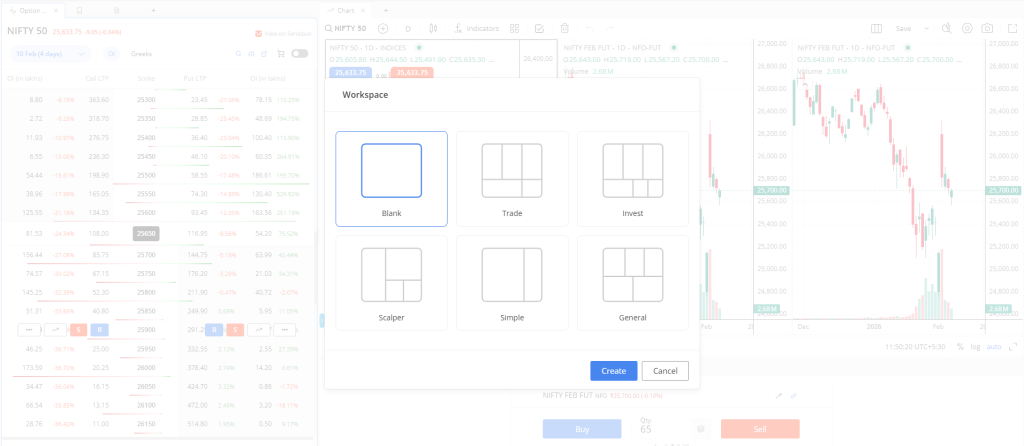
For traders who’ve always wished their trading platform could adapt to their unique workflow rather than the other way around, Zerodha has just rolled out something worth paying attention to. Terminal Mode on Kite Beta represents a significant shift in how retail traders interact with their trading interface, bringing institutional-grade customization to the everyday investor.
Trading platforms have traditionally followed a one-size-fits-all approach, forcing users to navigate through multiple tabs and windows to access the tools they need. Terminal Mode changes this dynamic entirely. Now available on Kite Beta, this feature transforms your trading interface into a fully customizable workspace where you control what appears on your screen and where it sits. Think of it as moving from a fixed desk setup to a workspace you can rearrange based on whether you’re scalping, swing trading, or managing a long-term portfolio.
The standout aspect of Terminal Mode lies in its widget-based architecture. Your marketwatch, charts, order book, positions, and holdings now exist as independent widgets that you can drag, resize, and position according to your preference. Need your market depth alongside your order window while keeping an eye on your profit and loss? You can arrange that. Prefer a chart-heavy layout with minimal distractions? That’s possible too. The flexibility extends to saving up to ten different workspace configurations, which means day traders can maintain one layout for active trading hours and another for post-market analysis.
What makes this particularly practical is the integration of essential trading tools directly into the interface. The Quick Order widget enables instant market orders without navigating away from your charts. Margin and brokerage calculators sit right where you need them, eliminating the mental friction of switching contexts when evaluating potential trades. The Top Panel provides real-time visibility of your P&L and margin utilization, while the Sticky Order Window ensures your order placement interface remains accessible regardless of where you are in your workflow.
For those managing multiple monitors or working with ultrawide displays, Terminal Mode supports multiple panels side-by-side, maximizing your screen real estate. The platform also allows workspace sharing, which could prove valuable for trading communities or mentorship programs where experienced traders want to share their proven layouts with newer participants.
Zerodha has added thoughtful touches that acknowledge the intensity of trading. A built-in Pomodoro Timer helps maintain focus and encourages breaks during extended trading sessions. There’s even a customizable wallpaper feature and integrated games like Flying Kite and Snake for those brief moments between trades. These additions might seem frivolous at first glance, but they reflect an understanding that trading requires mental stamina and that brief resets can improve decision-making.
Currently in beta, Terminal Mode does come with some limitations worth noting. The feature exclusively supports TradingView charts, with ChartIQ integration still pending. Some chart preferences and minor fixes remain in development, which is expected given its beta status. Zerodha has actively invited user feedback to refine the experience before a wider rollout.
This launch positions Zerodha firmly in the conversation about next-generation trading interfaces. As algorithmic trading and advanced analytics become more accessible, the platforms that allow traders to work more efficiently will naturally attract serious market participants. Terminal Mode demonstrates that customization and user experience improvements don’t need to come with institutional-level price tags.
For traders who’ve felt constrained by traditional platform layouts or who’ve been jealous of the multi-monitor setups typically reserved for professional trading desks, Terminal Mode offers a democratized alternative. The ability to create purpose-built workspaces for different trading strategies or market conditions could genuinely impact how efficiently you execute your trading plan.
If you’re interested in exploring Terminal Mode, head over to Kite Beta and experiment with building a workspace that matches your trading approach. The beta phase provides an opportunity to influence the final product through feedback, making this an ideal time to get involved and shape a tool you’ll potentially use daily.
Ready to experience enhanced control and customization?
kite-beta.zerodha.com